BawCraftWorx Downloads

All BawCraftWorx downloads are now available for purchase from my Etsy shop. Please Click "SHOP" In the Menu Above. Or Click the following link: https://www.etsy.com/shop/BawCraftWorx


Saturday, August 28, 2010

Thursday, August 26, 2010

Spellbinders Card Making Ideas

Vickis Card Making Ideas

I stumbled upon this site today and found it very inspirational. See for yourself HERE! :)

More Blog pimpin'

http://bawcraftworx.blogspot.com/

More Blog pimpin


I just found an amazing blog with info on how to pimp your blog:)
Check It out here: http://shabbyblogsblog.blogspot.com/search/label/tutorials


Cricut Cartridge Storage By ChristysCricutCreations


Here is my new cartridge storage. It hangs on the wall right beside my bugs, so swapping cartridges is a breeze. The clear pockets allow me to see the cartridge names, and prevents me from having to move labels as I aquire more cartridges. It is a calander pocket chart and can be found at the office supply store Staples http://www.staples.com/office/supplies/p1_Pacon-Monthly-Calendar-Pocket-Chart_103761_Business_Supplies_10051_SEARCH. Six of the rows have seven pockets, and the top row is one long pocket. It will hold 49 cartridges and I love this new solution for storage!!!

Wednesday, August 25, 2010

Making Links Open In New Windows

I made the following Tutorial feel free to save the image if u need it:) If used in a website please provide a link back:) I had to put it in img format because the code wont show up on blogger lol. Click img to enlarge. Link will open in a new window:)

Adding Images To Your Forum Posts -By Archangel

It's easier than it seems.
Whenever I find an image online that I like, instead of uploading it, I do the following:

Right click on the image & "copy image location."
Then it I place it between the following bb code tags:
(no spaces, i just used them to make the code show up).

[ img ] This tag goes BEFORE the URL of the image.
[ /img ] This tag goes at the end of the image Url.

example-do not click: [ img ] http://image_location_link [ /img ]

Another way to do it is simply paste the image location url wherever you want the image to show up in your post.
Highlight it and then click the tiny picture button at the top.

When you scroll over it with your mouse, a text block will come up that says "insert image" click it and it will automatically put the tags before & after the image url in their proper places.

To make sure its where you want it, click the preview button below.

Then scroll down to the text field where you enter your message to perform any corrections you want.

click the preview button again, just to make sure it's how you want it & whenever you're happy with the look, click post. And that's it.

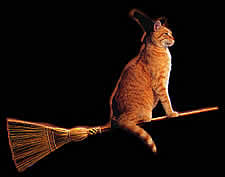
so now I will use an actual picture to show you the result. when typed properly, the code is invisible, and only the image will appear, like so:


once again to show you how its done

this is the image Url I used: http://www.mycatsite.com/images/witchcat.jpg

This is how it looks in code (remember, no spaces):

[ img ] http://www.mycatsite.com/images/witchcat.jpg [ /img ]

I chose this picture because it's hilarious and I knew everyone would love it, especially Mystikal Melita:)

So if you like, use this thread to practice. That's right, I said practice! Simply post a reply to this thread using any image(s) you wish and when you've got it, you'll get so used to doing it you won't need to refer back here. But in case you do, it'll be here when you need it.

Blessings I hope this helps. Smile
-Archangel

Anne Geddes On Blogger

Ok I just logged into her site and lo and behold shes on Blogger. How awesome is that? You can also merge your Facebook, Twitter, Blogger, Youtube, I-Google, and I-Phone accounts with her site. So, of course, I did it all like SQUEEEE! So for all of you who love her like I do here is her Blogger link http://blog.annegeddes.com/ I'll see you there xoxoxoxoxo.

Tuesday, August 24, 2010

How to create the copyright symbol © on pc & mac

How To create the Copyright symbol © on a PC:

*hold down the Alt key while keying in the numerics 0169
* (For those who don't know, the numerics are the number keypad on the far right of your keyboard).
Try it!

On a Mac:

*simply enter Option + G

Monday, January 25, 2010

Download Inkscape FREE


This is the place where you dl Inkscape, the program I use to convert images to SVG format to use with SCAL (sure Cuts A Lot) with my cricut machine.

http://www.inkscape.org/download/

Saturday, January 16, 2010

MY FREE CLOTH DIAPER SEWING PATTERN


Just wanted to let everyone know I've made my own cloth diaper pattern and I am sharing it freely with anyone who has need for it. When you print the images, select FIT TO PAGE. Use 1/4 inch seam max for the front, back & tabs and a 2" seam for the soaker otherwise it will be too wide and baby will walk funny lol.
To download the pattern right click images below, select "view image", right click again & select "save image as":


Saturday, August 29, 2009

Another New Cart


Update ;P
Well I've moved, I'm almost completely settled in, and as a treat to myself, I finally bought the Cricut Design Studio (about 3 weeks ago). So now I can really have some fun, once I get my craft room set up lol. So today I got the Indie Art Cart and Again, like you didn't already know, I'll be going underground to whip up some awesomeness to share:)

Thursday, July 23, 2009

OMG I am So in love with this...

Ok I'm a squirrel FREAK and this woman is my hero check out her video, I'm soooo spelled out right now, by her awesomeness, the song, and the squirrel that I have watched it like 5 times, you need to check out her blog I'm subscribed to her blog & youtube she rules...
Go give her oodles of love & props xoxoxoxox

http://thepinkstamper.blogspot.com/2008/05/episode-17-cricut-card.html

Monday, July 13, 2009

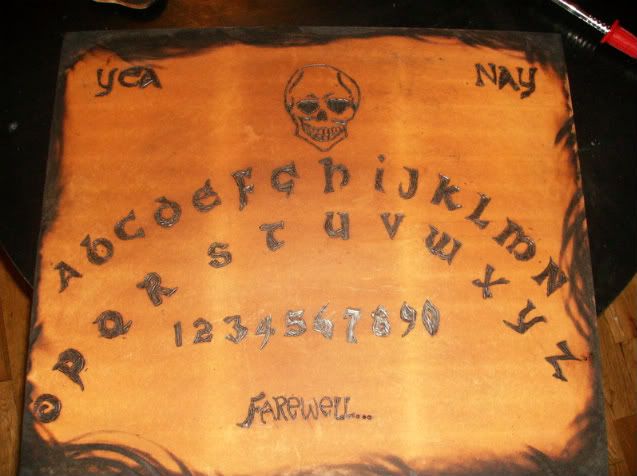
Aelwyn's Ouija Board

This is just sooo beautiful you need to check it out...

There are More pics on her Blog HERE!

She makes these for order also, to contact by email use this address: aelwyndaeira@yahoo.ca

Wednesday, June 3, 2009

Totally Free Crochet Patterns

Tina Crochet Calabrese's Totally Free Crochet Pattern Blog was born out of the inheritance of hundreds of crochet patterns (that no longer are covered by copyright, or are now in the public domain) along with my personally collected stash and own creations, combined with the understanding that YOU NEED ANOTHER PATTERN for that PAS or Pattern Acquisition Syndrome. Tell your crochet friends to come and get some free patterns!

http://totallyfreecrochetpatterns.blogspot.com/


Another Great Crochet Pattern Link
Found some more fab free Patterns here
http://www.freeeasycrochetpatterns.net/

Grandmothers Pattern Book:)
http://grandmotherspatternbook.com/

Pretty Scrappy & PSE Tutorials

Well I just joined Pretty Scrappy Forum to learn to use all the magnificent digi scrapbooking dls I got from Rachel, and they have a section where someone was sweet enough to not only offer tutorials but post links to them.

I highly recommend Joining the Pretty Scrappy Store for all your digi scrapping needs, and the most amazing designs in the universe. And make sure to join the forum linked above also because they have AMAZING customer support :)

These are 2 of the tutorial links I found there, and they are amazing....
http://mistycatodesigns.blogspot.com/

http://www.hummiesworld.com/Tutorials.html

Tuesday, June 2, 2009